Billing, trial and subscription
What you are charged and when, who sends your invoices, and exactly what happens if a payment fails or you decide to leave.
The 7-day free trial
You choose your plan at the end of the signup wizard and pay through Paddle, the company that handles payments for us.
- Your card is saved at checkout. Paddle needs it on file to open the subscription.
- Nothing is charged on the day you sign up. No deposit and no setup fee.
- Your system is built straight away and is the real thing, not a limited demo.
- On day 7 the first monthly charge is taken automatically, unless you have cancelled before then.
- We email you about two days before the trial ends, so the first charge is never a surprise.
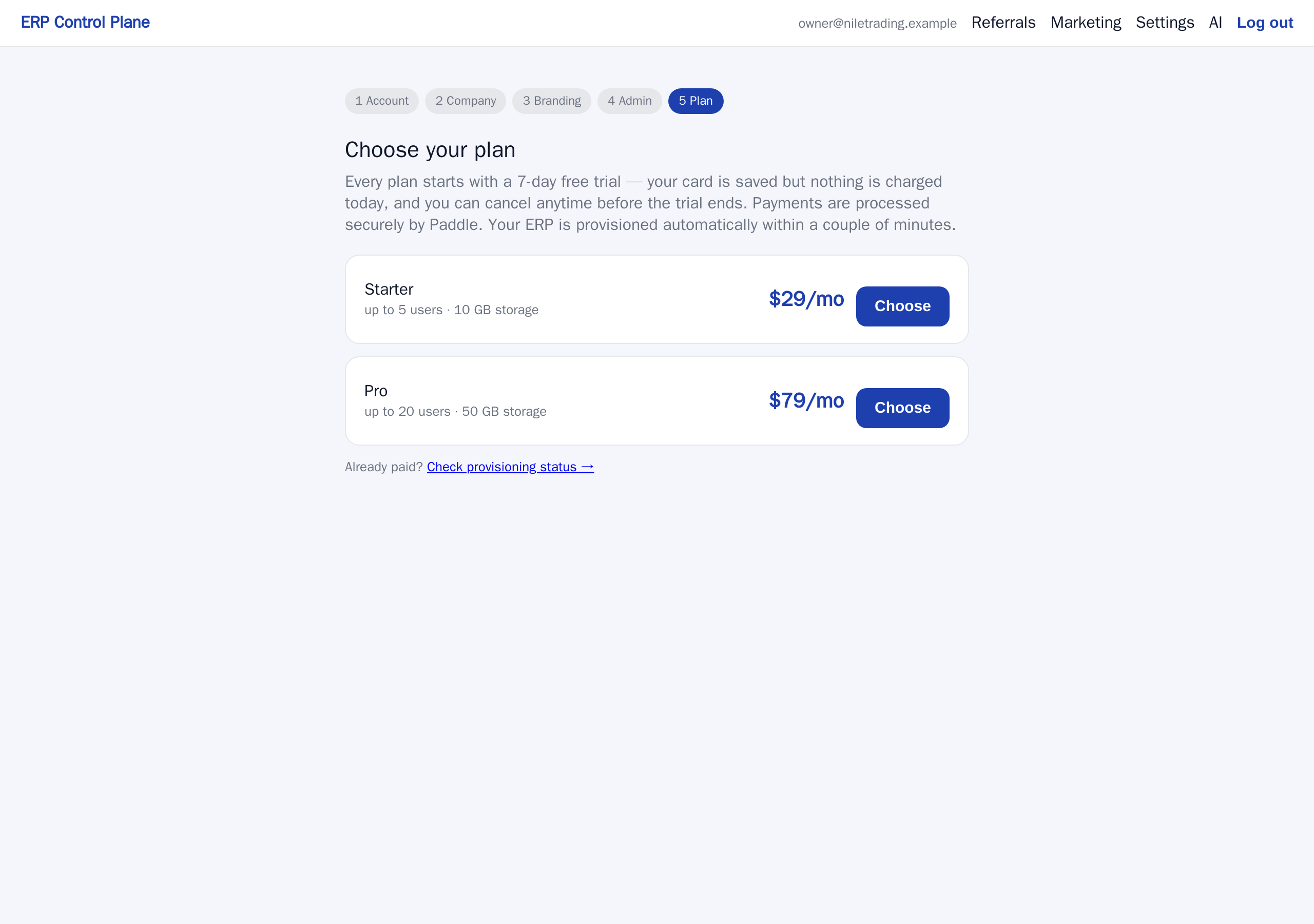
Your card details are typed into Paddle's own checkout window. They never reach us and we never store them. What we see is which plan you are on and whether the subscription is paid.
Who bills you
Paddle is the Merchant of Record, which means Paddle — not us — is the legal seller of your subscription. Three practical consequences:
- Invoices and receipts come from Paddle. The line on your card or bank statement normally shows Paddle's name, not ours.
- Tax is handled by Paddle. They work out the VAT or sales tax that applies in your country, add it where required, collect it and pay it over. You do not have to work out which tax rules apply to buying software from abroad.
- Refunds are processed by Paddle, back to the card you paid with.
If Paddle's checkout offers a company-name or tax-number field for your country, fill it in while you are subscribing. That is what puts your company details on the invoices your accountant will file.
The plans
| Plan | Price | People who can sign in | Storage |
|---|---|---|---|
| Starter | $29 / month | 5 | 10 GB |
| Pro | $79 / month | 20 | 50 GB |
Prices are per month, before any tax Paddle adds for your country. The plan page at signup always shows the current prices and limits.
Both plans include every module — accounting, stock, selling, buying, CRM, HR, projects and manufacturing. Modules are not sold separately, and no feature unlocks by paying more. The difference between Starter and Pro is two things: how many people can sign in, and how much storage your files and backups may use.
Storage: what counts, and what happens near the limit
Storage is a fair-use allowance. It counts three things on your ERP: its database, the files attached to your documents, and the backups kept on the site. We measure it once a day, and the Billing page shows the latest figure.
Nothing is ever blocked because of storage. When your ERP reaches 80% of the allowance, the account owner gets an email; at 100%, a second one. From there you can remove attachments you no longer need, or move to a larger plan.
Changing plan
Moving between Starter and Pro raises or lowers those two limits without touching any of your data.
If you move to a plan with fewer seats while more people are active, nobody is switched off. The Users page says how many to deactivate, the account owner gets an email, and until you are back within the plan the control panel will not add or re-enable anyone. An accountant you invited never uses a seat.
- Email support@nezmaro.com saying which plan you want to move to.
- Paddle applies the change and charges the difference pro rata — that is, you pay only for the days left in the month, and the part you already paid for is credited against the new price. You are never charged twice for the same days.
- Your system picks up the new limits automatically, usually within a minute. Nothing restarts, nobody is signed out, and no data is touched.
If a payment fails
Cards expire and banks decline things. This is exactly what happens, so it does not surprise you.
- Paddle cannot take the payment, emails you about it, and tries again over the following days.
- Paddle tells us the subscription is past due, and we put your system into maintenance mode: the address stops showing your system and shows a short maintenance page instead, and nobody in your company can sign in.
- Nothing is deleted and nothing is changed. Your database, your documents and your files stay exactly where they were.
- As soon as a payment succeeds, Paddle tells us and maintenance mode is switched off automatically, normally within a minute. You do not need to contact us to have your system turned back on.
- Nothing is removed while Paddle is still retrying. For as long as Paddle keeps trying to collect the payment, your system stays locked but intact, and updating the card is all it takes to get back in.
- If Paddle stops trying and ends the subscription, your system stays locked and nothing is deleted that day. We email you the date it would be removed — never sooner than 30 days after the failed payment, and never sooner than 7 days after the subscription ends. From then on updating the card is not enough: restart your subscription from the control panel, and everything comes back.
If your payment has clearly gone through and your system is still showing the maintenance page fifteen minutes later, email us with your subdomain and we will look straight away.
Cancelling
You can cancel at any time from the Billing page in the control panel — the Cancel button takes you into Paddle's portal, which asks you to confirm — or by emailing support@nezmaro.com. There are two ways to cancel, and the difference matters:
- At the end of the period — what most people want, and what the Billing page does. The subscription stops renewing, and you keep working normally until the last day of the period you have already paid for.
- Immediately — the subscription ends at once. Email us for this one.
What happens after the cancellation takes effect
Nothing is deleted on the day you leave. Your system is locked — the site shows a maintenance page and nobody can sign in — and then kept, exactly as you left it, for 30 days (if it ends after a failed payment: until 30 days from that payment or 7 days from the end, whichever is later):
- The day the subscription ends, your system is locked. We email you to say so, and the email carries the date it would be removed.
- Through that period nothing is deleted and we keep taking nightly backups. Restart your subscription at any point and everything comes back — same address, same data, usually within a minute.
- We email you again before the end of the grace period, while your data still exists.
Only when the grace period runs out is the system actually removed, and that happens in this order:
- We check with Paddle first. If Paddle says the subscription is live after all, nothing is removed and a human looks at it.
- A final backup of your database and all attached files is taken.
- The backup is checked. If a good backup cannot be produced, your system is not removed and we investigate instead.
- Only then is the system removed, and its web address stops working.
- The final backup is kept for 90 days. At any point in that window you can email us and ask for an export of your data.
Refunds
- 14-day money-back guarantee. If you are not satisfied with your first purchase, email us within 14 days of that first charge and we will arrange a full refund through Paddle.
- Cancelled during the trial? No charge was ever made, so there is nothing to refund.
- A renewal charged when you meant to cancel? Contact us within 14 days of that charge and we will review it in good faith. We do not normally refund periods that have already been substantially used, except where the law requires it.
Refunds are issued by Paddle back to the original payment method, and usually take a few business days to appear on your statement. The full policy is on the Refund Policy page, and the billing terms are in the Terms of Service.
Where to find your invoices
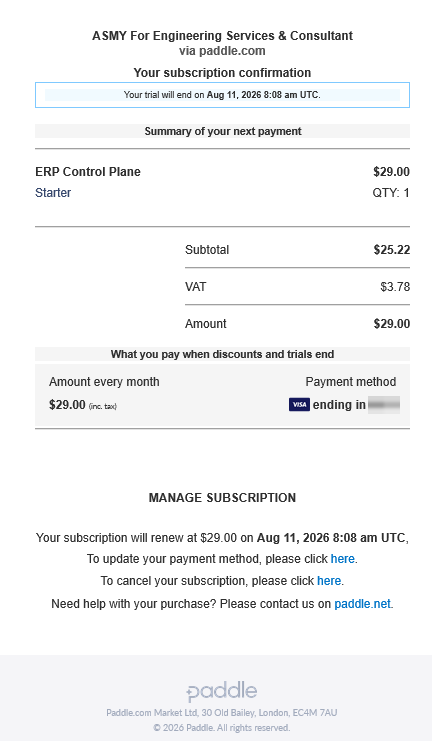
Paddle emails an invoice or receipt for every charge to the address you used at checkout. That email is the document your accountant needs.
- Each email contains a link to view and download the invoice as a PDF.
- The same emails link to Paddle's customer portal, where you can update the card on file and see your payment history.
- Nothing is lost if you delete an email — search your inbox for Paddle, or ask us and we will point you to the right place.
Common questions
Do you keep my card number?
No. Card details are entered into Paddle's checkout and stay with Paddle. We never see them.
Does adding a user cost extra?
No. You pay per plan, not per user. Adding people is free until you reach your plan's limit; after that you either free a place or move to the larger plan.
Will my system be deleted the day I cancel?
No. Cancel at the end of the period and it keeps running until that period ends; cancel immediately and it locks the same day. Either way it is then kept, locked, for 30 days (if it ends after a failed payment: until 30 days from that payment or 7 days from the end, whichever is later) — nothing deleted, still backed up nightly, and one restarted subscription away from working again. Only after that is it removed, and a checked final backup is taken first and kept for 90 days.
Something on my invoice is wrong
Email support@nezmaro.com with the invoice number and what needs correcting, and we will take it up with Paddle for you.